Overview
A custom client tool for a Human Design (人類圖) consultant whose workflow involves assembling a per-client PDF report from a large library of pre-written interpretation PDFs — one per Human Design "number" — where the specific combination of pages depends on each client's personal chart.
Before this tool: part of the workflow had been handled manually for each client delivery, which created recurring labor cost for a repetitive task that was a strong candidate for automation.
My engagement: I didn't get handed a spec. I interviewed his workflow — what inputs drive each client's output, which parts repeat across clients, how he groups his content mentally — and proposed a system design that matched how he actually thought about the work. That workflow model became the foundation of the product design.
The delivery: a single-executable local application he runs on his own machine. No cloud dependency, no separate server to manage, and no installation burden — he double-clicks an executable, his default browser opens, and the admin UI is there.
Live Demo
Below is a miniature, in-browser version of the real admin UI. It ships with eight mock interpretation PDFs generated on the fly with pdf-lib, three pre-made lists, and one template you can edit — so you can exercise the full three-level model (PDF → List → Template) without uploading anything. Tick items in the list rows, reorder rows, add or remove rows, then Merge & Download to get the composed PDF.
My Role
Solo engagement — pain-point discovery, product design, full stack build, and delivery:
- Interviewed the workflow. Figured out that his mental model wasn't "merge PDFs" — it was "group interpretations into themes, then compose per-client outputs out of those themes." That shaped the whole data model.
- Proposed the three-level data model — PDF atoms → named lists → ordered templates with per-row binding — as the solution. The key engineering contribution was deriving a data model that matched the client's mental model of the work, rather than treating the problem as a simple file-merging task.
- Built the React admin UI (CRA + MUI) with drag-and-drop row reordering via react-beautiful-dnd, inline template editing, and a separate page for managing lists.
- Built the Express backend — file upload, MD5-based PDF deduplication, server-side PNG preview generation, template persistence in JSON files.
- Packaged and shipped. Used pkg to compile the Node server + static bundle into a single executable, and the
openpackage to auto-launch the default browser — so the client experience is "double-click to start" with no install, no configuration, no ops.
Tech Stack
Frontend
Backend
Delivery
Architecture
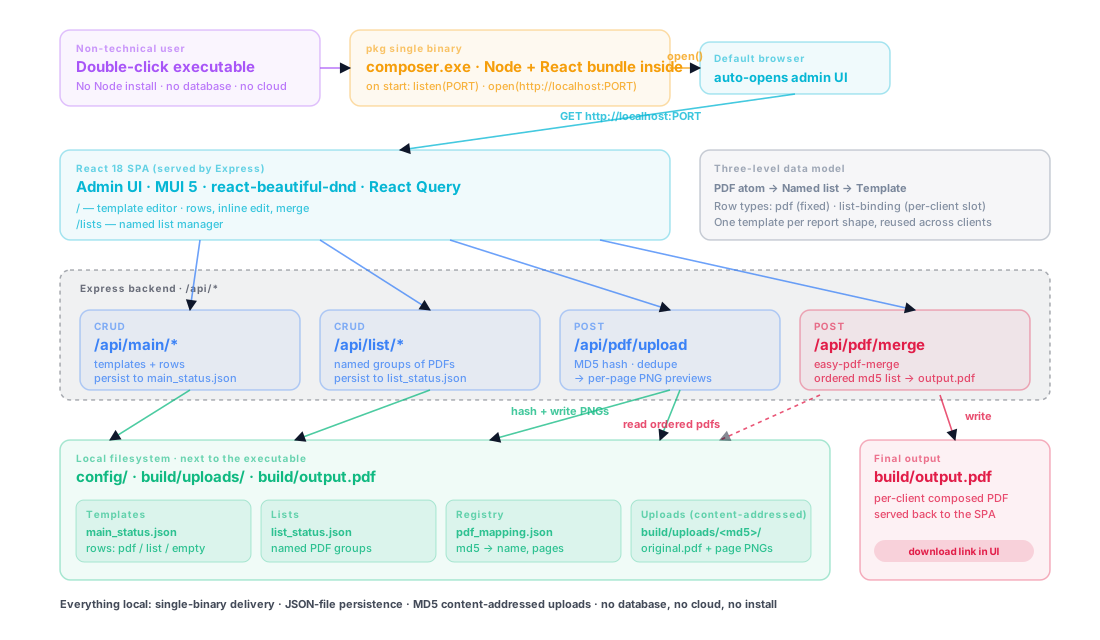
The system is a local React SPA + Express backend, packaged as a single executable, persisting everything to JSON files next to the executable:
Frontend (React 18 + MUI 5, served by Express):
/— template editor: pick a template, edit its rows, trigger a merge/lists— list manager: create and curate named groups of PDFs- Admin bar (always visible): template picker, rename, duplicate, delete, save, merge
Backend (Express):
/api/main/*— template CRUD/api/list/*— named list CRUD/api/pdf/upload— file upload + MD5 content hashing + PNG preview generation/api/pdf/images— returns preview URLs for a set of PDFs/api/pdf/merge— composes the final PDF from an ordered list of PDF MD5s using easy-pdf-merge
Persistence:
config/main_status.json— the list of templates and their rowsconfig/list_status.json— the named lists and their PDF membersconfig/pdf_mapping.json— the MD5 → filename / page-count registrybuild/uploads/<md5>/— one directory per unique PDF, containing the original file and its per-page PNG previews
Delivery:
pkgcompiles the whole server (including static assets and node_modules) into one native executableopenlaunches the default browser athttp://localhost:<PORT>on start- No Node install on the client machine, no database, no cloud
Key Challenges
1. The Product Surface Didn't Exist — The Client's Workflow Was Tacit
He couldn't tell me "I want a system that does X". He could tell me what the assistant did, what files were involved, and what each client received. Turning that into a mental model the software could implement was the real design work, not the code.
2. The Obvious Data Model Was Wrong
"Upload PDFs, drag them in order, merge" is the first-pass design — it's what every consumer PDF merger does. But that doesn't match his workflow. He has many pre-written PDFs he re-uses across clients; the specific combination is driven by the client's personal chart; and he mentally groups his interpretations into themes ("all love-related", "all career-related") that he mixes per client. A flat merger would force him to re-select the same files over and over.
3. He Is Not a Technical Operator
No command line, no Docker, no "install Node first". Any install friction or configuration step eats into the value of replacing the part-time hire.
4. No Cloud Hosting, No Data Leaves His Machine
Client interpretation PDFs are his proprietary content. Uploading them to any third-party host was out of scope.
5. Per-Client Outputs Look Similar But Differ in Detail
He does have a rough standard structure — intro, then theme 1, then theme 2, then closing — but which specific interpretations go into each slot changes per client. A single flat "ordered list" doesn't capture the "slot with variable content" pattern.
Solutions & Design Decisions
Three-Level Data Model: PDF → List → Template
This is the core design contribution:
- PDFs are content atoms — each interpretation PDF uploaded once, identified by MD5 content hash.
- Lists are named groups of PDFs, matching how he mentally organizes content ("love interpretations", "career interpretations", "health section").
- Templates are ordered compositions of rows, where each row can be:
- a specific PDF (always the same in every output),
- a binding to a list (pick from that list at merge time — the variable slot),
- or an empty placeholder.
The list-binding row type is what made the model fit his work. His "intro" section is always the same PDF → fixed row. His theme 1 slot is always "one PDF from the love list" → list-binding row, pick per client. He creates one template per report shape; each client just means selecting different items inside the list bindings.
MD5 Content Hashing for De-duplication
Each uploaded PDF is stored in build/uploads/<md5>/. Re-uploading the same PDF resolves to the same directory, reusing the existing PNG previews. He never has to think about "have I uploaded this already"; the filesystem enforces uniqueness by content.
Desktop-Style Delivery (pkg + open)
pkg compiles the entire Node.js server, its dependencies, and the built React bundle into one self-contained executable. On launch, the server calls open(http://localhost:<PORT>) to pop open his default browser at the admin UI. From his perspective it's a desktop application — double-click to launch, use the browser UI, close when done. His data stays in the config/ and build/uploads/ folders next to the executable.
JSON Files Instead of a Database
Three flat JSON files under config/ hold all persistent state. No database install, no migration step, no version management. Backup is "copy the config/ folder". For a single-user local tool, this is the right complexity level.
Server-Side PNG Previews with Caching
On upload, each PDF is run through pdf-to-png-converter to produce per-page PNG thumbnails into the same <md5>/ directory. The preview endpoint returns image URLs, so the UI renders thumbnails without the browser ever opening the PDF itself.
Results & Impact
Replaced Recurring Manual Labor
- The recurring manual assembly task is now a templated workflow the consultant runs himself in minutes
- Fixed software cost replaces ongoing per-client labor cost
Product Shape Matches His Actual Work
- One template per report shape, reused across all clients
- Per-client variation is captured by list-binding rows — pick different items at merge time
- Content organization (lists) decoupled from output structure (templates)
Zero Ops Burden For The Client
- Single-binary delivery — no Node install, no database install, no Docker
- Data stays on his machine — nothing uploads to a third-party cloud
- Backup = copy a folder
Technical Foundations That Aged Well
- MD5 content hashing means no stale-file problem — upload once, reuse forever
- JSON persistence is trivially inspectable and editable by hand if needed
Learnings
Workflow Discovery Was the Real Engineering Work
The implementation stack was straightforward; the harder part was understanding the client's workflow well enough to model it correctly. Spending time with him until I could describe his workflow better than he could was what made the data model (PDF / List / Template-with-row-types) fall out naturally. Skipping that step would have produced a flat merger that didn't match how he actually worked.
Three Levels Beat Two Levels When Content And Output Are Semi-Independent
The first-pass model was two levels (PDFs + Templates). Introducing Lists as a middle layer decoupled "how I organize my content" from "what the output looks like". That decoupling is what made templates reusable across clients — each template says which slot pulls from which list, and the per-client work is picking inside the list, not rebuilding the template.
Desktop Delivery for Non-Technical Users Is Worth the Extra Work
Compiling to a single executable and auto-launching the browser adds a packaging step I'd skip for a technical user. For this client it was the difference between "works" and "shippable" — an "install Node, run npm start, open localhost" onboarding would have been unworkable for a non-technical user.
JSON Files Were the Right Persistence Choice
A database would have added unnecessary complexity for a single-user local tool; a small set of JSON files was sufficient and easier to back up, inspect, and evolve.
Freelance Value Often Comes From Identifying Repetitive Work Worth Automating
The client came with a general "I need a PDF tool" brief. The engagement became valuable once I reframed it as replacing recurring manual assembly work with a reusable software workflow. That made the value concrete and kept the scope disciplined around labor-saving outcomes.
Deep Dive
From Workflow Interview to Concept Sketch
Before any code, the design was worked out on paper. These are two of the original concept sketches from the workflow discovery phase — the point where the problem stopped being "merge PDFs" and became a reusable composition model: PDFs as content atoms, Lists as thematic groups, and Templates as ordered report structures. The shipped UI tracks these sketches closely.
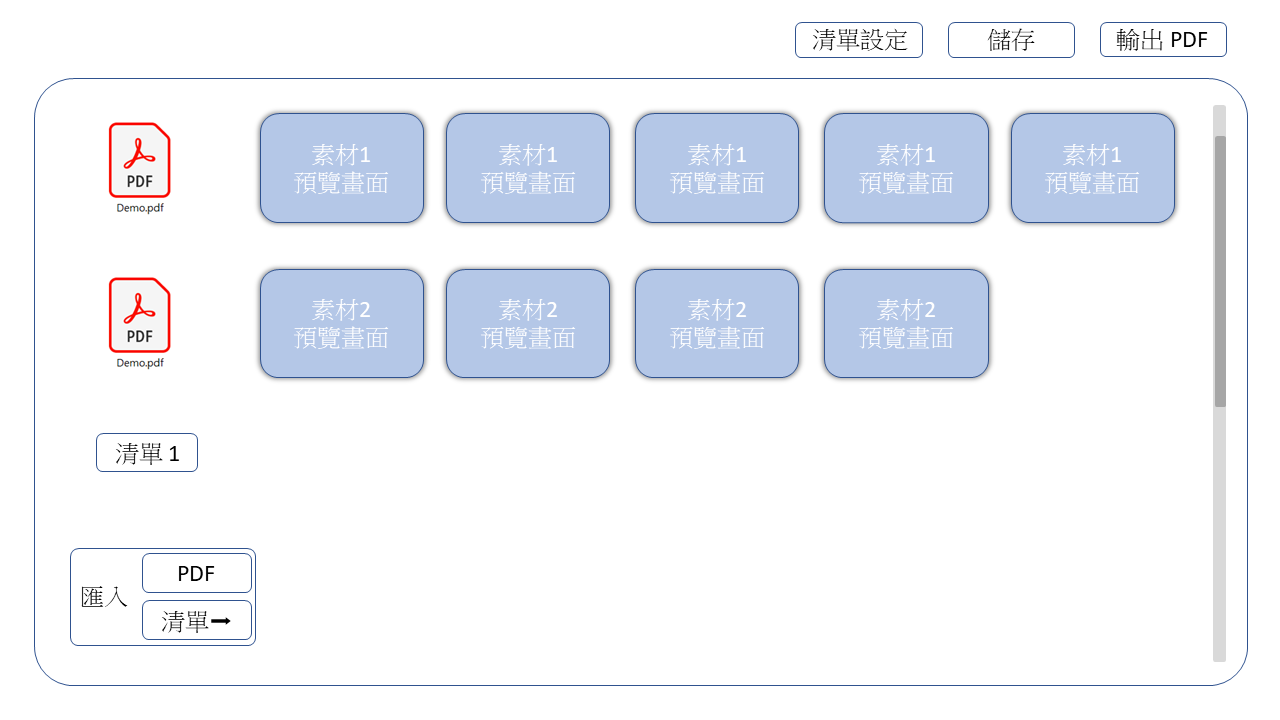
Template editor — each row is either a fixed PDF or a binding to a list. Per-client work is picking items inside the list bindings. The three-level data model in one screen.
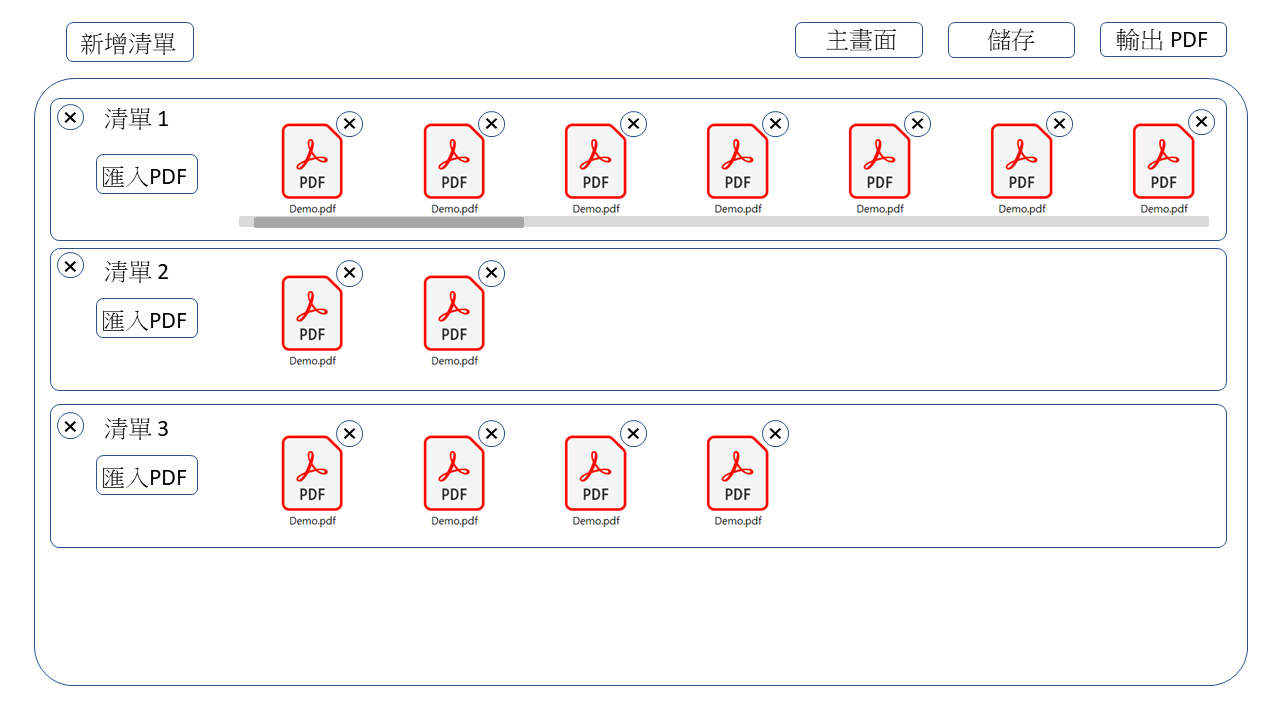
List manager — the middle layer. Each list is a named, curated group of PDFs (e.g. "love interpretations", "career interpretations") that templates bind to. Content organization is decoupled from output structure.
The Three-Level Data Model
The Decoupling That Made Templates Reusable
Two levels (PDFs + Templates) would have forced him to rebuild a template per client. The third level — Lists, as a named middle layer — means one template per report shape, and per-client work is picking items inside each list binding. The template survives across clients unchanged.
| Level | What it represents | Persistence |
|---|---|---|
| A single interpretation PDF — one Human Design theme / number | build/uploads/<md5>/ directory with the file + per-page PNGs | |
| List | A named group of PDFs (e.g. "love interpretations") | Entry in config/list_status.json |
| Template | An ordered sequence of rows; each row is PDF / list-binding / empty | Entry in config/main_status.json |
Row Types Inside a Template
{
  "templates": [
    {
      "id": "tpl-standard-report",
      "alias": "Standard Client Report",
      "rows": [
        { "type": "pdf",  "id": "r1", "alias": "Intro",        "detail": { "<md5>": { "name": "intro.pdf" } } },
        { "type": "list", "id": "r2", "alias": "Love Theme",   "selected": [] },
        { "type": "list", "id": "r3", "alias": "Career Theme", "selected": [] },
        { "type": "pdf",  "id": "r4", "alias": "Closing",      "detail": { "<md5>": { "name": "closing.pdf" } } }
      ]
    }
  ]
}
Why Row Types Beat Another Level of Nesting
Making the row itself polymorphic — PDF or list-binding or empty — keeps the template structure readable at a glance while supporting the variable-content slots. A flat "always pick from a list" design would have added ceremony for the fixed parts (intro, closing) he never changes; a flat "always a specific PDF" design would have forced him to rebuild the template per client.
The Merge Endpoint
router.post("/merge", asyncHandler(async (req, res) => {
  const md5s = await pdfPathGenerator(req.body);
  merge(md5s, `${process.cwd()}/build/output.pdf`, (err) => {
    if (err) return console.log(err);
    res.status(201).json({ results: `http://localhost:${PORT}/output.pdf` });
  });
}));

// Client-side flattening: walk the template rows, expand list selections
const flattenRows = (rows) => {
  const ids = [];
  for (const row of rows) {
    if (row.type === "pdf")  ids.push(Object.keys(row.detail)[0]);
    if (row.type === "list") row.selected.forEach((s) => ids.push(s.id));
    // "empty" rows contribute nothing
  }
  return ids;
};
Upload + MD5 De-duplication + Preview Generation
router.post("/upload", asyncHandler(async (req, res) => {
  if (!req.files) return res.status(400).send("No files were uploaded.");
  const fileDetail = await fileHandler(req.files.pdf);
  // fileHandler: hash contents → mkdir build/uploads/<md5>/ if new
  //              → save PDF + render per-page PNG previews via pdf-to-png-converter
  //              → update config/pdf_mapping.json with name / count
  res.status(200).json({ results: fileDetail });
}));
Re-uploading the same PDF content resolves to the same <md5>/ directory — previews are reused, not regenerated.
Desktop-Style Delivery
{
  "scripts": {
    "start": "node ./index.js",
    "build": "pkg ./index.js -c package.json"
  },
  "pkg": {
    "scripts": "*.js",
    "assets": ["node_modules/**/*", "build/**/*", "utils/*"]
  }
}
import open from "open";
// ... Express server startup ...
app.listen(PORT, () => {
  console.log(`Listening on ${PORT}`);
  open(`http://localhost:${PORT}`);    // pop the default browser at the UI
});
Desktop-Style Delivery Was Essential for Adoption
Using pkg and open made the tool feel like a desktop app for a non-technical user, which was critical to making the delivery actually usable. Anything short of that — explaining ports, Node, or localhost — would have eaten into the value of the engagement.
This case study describes the engineering approach and public-safe architectural decisions. Internal identifiers, business rules, proprietary implementation details, and sensitive operational data have been omitted or generalized.