Overview
An internal self-service Ansible portal built for teams that wanted a "templates + inventory + history" workflow with SSO and audit trail, with a simpler deployment and operating model than a full Tower deployment. Non-Ansible users launch Playbooks through a web UI — pick a template, fill in target hosts and variables, watch the live output — while the platform owners keep every execution in a MongoDB-backed audit log.
Why a lighter-weight alternative made sense: the team had a fixed budget, an existing Azure AD directory, and a focused workflow. A small, purpose-built portal — SAML login, inventory + workspace editor, template CRUD, Playbook launcher with live log, and structured history — gave them self-service Playbook launches with auditability, without the full Tower feature set they did not need.
Core workflow: a login page, a main page listing templates and recent run history, a template editor, and a launcher that streams live ansible-playbook output; every run is persisted with status and full log.
Deployment: a bundled Ansible installer delivers MongoDB, the portal binary, and the service unit to the target host in one command.
Live Demo
An interactive rebuild of the portal — same page structure as the original (main / template editor / run log / settings) but with a modern UI and an in-browser mock backend driving templates, history, and streaming ansible-playbook output.
Try it
- Launch a template. Watch a live
ansible-playbookstream produce PLAY / TASK / RECAP output with per-host results, then land on a recorded run entry. - Hit Security Patch · prod. That template is seeded to fail, so you can see the failure path — fatal line, red status, and a summary row.
- Edit workspace or inventory under Settings — the templates launch against the inventory group names you define there.
Relationship to Ansible Tower Concepts
For readers familiar with Tower, here is how the portal's domain maps over:
| Tower Concept | Portal Equivalent |
|---|---|
| Project (Git source) | Workspace — the ansible.cfg content, persisted in MongoDB |
| Inventory | Inventory — the hosts content, persisted in MongoDB |
| Job Template | Template — stored alongside target, extra vars, Playbook choice |
| Credential | Stored outside the template and injected at launch time |
| Job History | History collection with per-run status + full log |
| Job (running) | Short-lived temp directory + ansible-playbook subprocess |
| Organization / RBAC | Not implemented (single-tenant scope) |
My Role
End-to-end owner — designed, built, and shipped the whole thing solo:
- Defined the product scope — which Tower capabilities to include and which to leave out
- Chose Node.js + Express + TypeScript for the server, packaged as a single deployable artifact for on-prem environments
- Designed the data model for templates, inventory, workspace configuration, run history, and logs
- Built SAML integration with Azure AD for SSO
- Authored the web UI (login / main / settings / template editor / log view) and the REST API behind it
- Designed the Playbook status-callback pattern so every run reports back with a structured status rather than stdout parsing
- Packaged everything as a bundled Ansible installer so the client could redeploy the portal to a new host with minimal manual setup
- Ran performance characterization across VM sizes and fork counts to give the ops team a sizing baseline
Tech Stack
Backend
Auth
Storage
Deployment
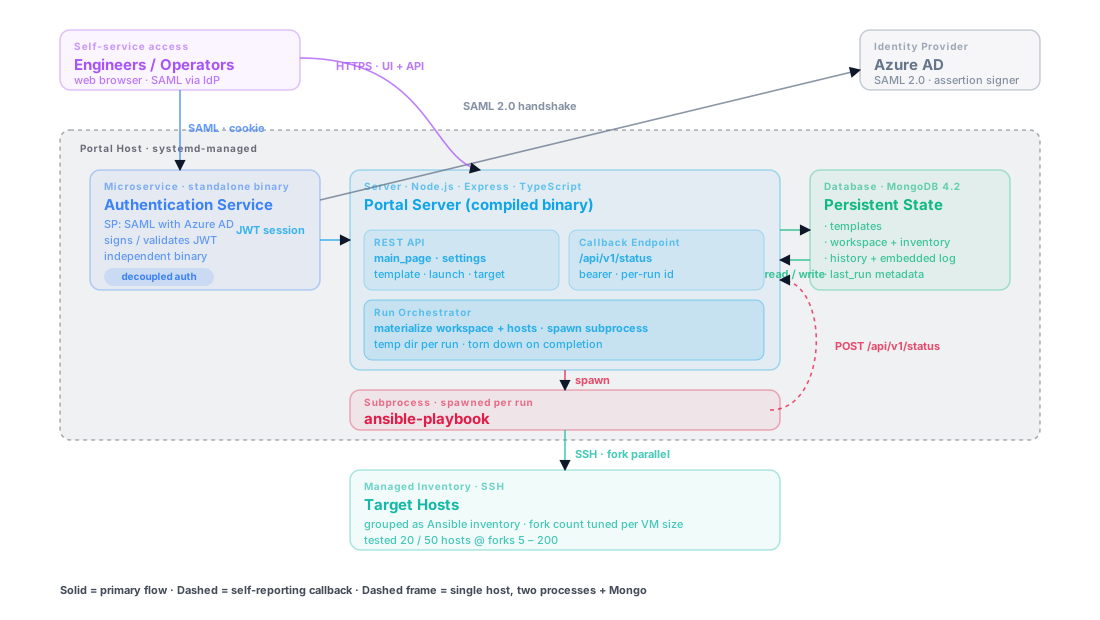
Architecture
A single-host internal platform with separate web, authentication, and storage components:
Web Portal (Node.js + Express): HTTP server that serves the UI and exposes the REST API. Talks to MongoDB for all persistent state. Spawns ansible-playbook subprocesses for launches. Packaged as a single deployable artifact so the on-prem host carries minimal runtime dependencies.
Authentication Component: A separately deployed process that handles SAML 2.0 SSO with Azure AD as the IdP and manages portal session handling. Split from the main portal so the authentication layer can be upgraded independently when the IdP changes.
MongoDB: stores templates, workspace / inventory documents, and run history with logs. No caching layer — the write volume is modest and the read patterns are simple.
Execution flow for a Playbook run:
- User clicks launch on a template in the UI
- Portal materializes the stored workspace and inventory as files on disk in a per-run temp directory
- Portal spawns
ansible-playbookwith the template's target, extra-vars, and playbook name - A wrapper Playbook reports the run's final status back to the portal via a callback endpoint (details in Deep Dive)
- Portal persists the status and full log into the run history
- UI polls the history endpoint and streams the log to the browser
Key Challenges
1. Closing the Loop on an Asynchronous Run
The portal's launch API is fire-and-forget — it spawns ansible-playbook as a subprocess and returns immediately so the caller can start watching the run. Something still needs to close the loop at the end and tell the portal "run 1742 finished, here is the outcome". Ansible doesn't offer this natively; the options are reading the subprocess exit code, parsing stdout, writing an Ansible callback plugin, or having the Playbook itself report back. Picking among those was a real trade-off, not an obvious choice.
2. Workspace + Inventory Live in Different Places
Ansible expects the inventory file, ansible.cfg, and the Playbooks to all coexist on disk at runtime. The portal stores them in MongoDB. Bridging "edit in web UI" to "run on disk" without leaving stale files or leaking state across concurrent runs is non-trivial.
3. SAML with Azure AD Is Finicky
Azure AD as an IdP has specific expectations about assertion format, certificate chains, and allowed clock skew. First-run integration always involves a day of staring at SAML response XML in browser devtools.
4. Deployment Must Be Repeatable Without the Client's Engineers Knowing Ansible
The portal was packaged and deployed through its own Ansible installer. If redeployment requires reading YAML and editing variables, the value proposition collapses. The installer had to be idempotent and runnable by someone who only knows "click, wait, verify."
5. Parallelism Has Practical Limits
Ansible's forks setting looks like a free throughput lever, but in practice each fork opens an SSH connection and spawns Python processes on the controller. Past a certain count, the controller starves — especially on small VMs.
Solutions & Design Decisions
Status Callback Pattern — a pragmatic choice, not the richest one
Every template the portal creates is wrapped in a driver Playbook that POSTs its terminal status back to the portal at the end of the run — success: 1 on the success branch, success: 0 on the failure branch. The portal allocates the run id before spawning the process and correlates the callback back to the history entry.
This was not the most powerful option available — Ansible's native callback plugins (Python hooks into the Ansible runtime) would have given per-task, per-host structured events. Writing and maintaining a Python plugin on top of a TypeScript platform was not worth it for the scope. The Playbook-as-HTTP-caller approach was a thin, readable alternative the team could modify entirely in YAML. See the retrospective in Learnings for what I would choose today.
Per-Run Workspace Materialization
When the user launches a template, the portal writes the workspace config as ansible.cfg, the inventory as a per-run hosts file, and injects extra variables via --extra-vars. Each run gets a temporary directory that is torn down on completion, so concurrent runs never see each other's files and stale state cannot accumulate.
Separated Auth Service
SAML handshake lives in its own process with its own binary, its own keypair, and its own upgrade cadence. The main portal treats it as an opaque "give me a user for this cookie" service behind a well-defined API. When SAML got upgraded to handle a new Azure AD quirk, the main portal did not redeploy.
Single-Command Ansible Installer
The entire installation — MongoDB, portal artifact, service unit, keys — is packaged as a bundled Ansible installer with all assets in a sibling directory. The same installer supports fast redeployment to a new host when IP addresses or environments change.
Performance Testing as a Deliverable
Rather than leave the ops team guessing, I ran a test matrix (fork counts 5 / 10 / 15 / 30 / 50 / 75 / 100 / 150 / 200 × target counts 20 / 50 × VM sizes 2C/4R and 4C/8R) and delivered the results as a spreadsheet. The output is clear sizing guidance for controller VM selection and fork-count tuning.
Results & Impact
Covered the team's core self-service workflow
- SAML SSO via Azure AD (integrated with the client's existing directory)
- Template CRUD with inventory / extra-vars / playbook selection
- Live log streaming during Playbook runs
- Full audit history with per-run success / fail status and full log payload
- Workspace + inventory editor persisted to MongoDB
Operational Footprint
- Single portal artifact + MongoDB + one managed service
- Minimal runtime dependencies beyond the packaged installer artifacts
- Reinstallable in minutes via the bundled Ansible playbook
Performance Envelope (Documented)
- Tested fork counts 5 to 200 against 20 and 50 hosts
- Characterized controller saturation on 2C/4R and 4C/8R VMs
- Delivered sizing guidance to the ops team
Cost Impact
- Avoided Ansible Tower licensing for the scope of this team's workflow
- No additional SaaS dependencies beyond the client's existing identity stack
Learnings
Retrospective: feedback channel choices
Looking back, there were more viable approaches to terminal-status handling than I appreciated at the time. With more Ansible experience, the landscape breaks down like this:
- Subprocess exit event — read the process exit code via
child.on("exit", ...)in Node, paired with the stdout/stderr capture already needed for the live log. The simplest option, adequate for most cases. - Ansible callback plugin — a Python plugin hooked into the Ansible runtime, emitting structured events for every play, task, and host. The richest option; this is what Ansible Tower / AWX use.
- HTTP callback from the Playbook itself — what I actually built. A pragmatic middle ground that kept the implementation readable and maintainable in YAML, without introducing a Python component.
In hindsight, I would probably start with subprocess exit events and only move to richer integrations — a callback plugin — if the product genuinely needed task-level progress reporting.
Packaging as a Single Artifact Simplified Operations
Bundling the portal into one self-contained deployable artifact removed an entire class of deployment problems — no runtime installer, no package manager, no virtualenv on the target host. For an on-prem portal with no internet access, this was a concrete win.
Splitting Auth From Business Logic Pays Off Quickly
The separate authentication binary looked like over-engineering on day one. Six months later, when Azure AD pushed a SAML change, only the auth process had to be rebuilt and reshipped. The main portal did not rebuild, did not redeploy, and did not change its session-cookie contract.
Performance Testing Became Operational Documentation
A spreadsheet of fork-count vs. latency under different VM sizes is worth more than a README paragraph. Operators use it to make sizing decisions; developers use it to set sensible defaults. It is the kind of artifact nobody produces because it is tedious — so producing it is disproportionately valuable.
Deep Dive
Status Callback Contract
The status-callback pattern means the Playbook itself reports its success or failure back to the portal via a small HTTP call at the end of the run — instead of the portal trying to parse ansible-playbook's stdout. This is how every run's terminal status lands in the history collection reliably.
---
- import_playbook: "{{ _playbook }}"
  when: _playbook is defined
- hosts: localhost
  gather_facts: no
  tasks:
    - name: Ansible Portal
      uri:
        validate_certs: no
        url: "https://localhost:{{ post_port }}/api/v1/status"
        method: POST
        headers:
          Authorization: "Bearer {{ post_token }}"
        body_format: json
        body:
          id: "{{ post_id }}"
          template: "{{ post_template }}"
          success: 1
      register: login
Why A Bearer Token On The Callback?
Multiple Playbooks can run concurrently, each with its own ID. The portal needs to verify that the callback belongs to the correct run before updating history. The token is short-lived, single-use, and scoped to the run ID — it carries the "this callback belongs to this run" proof.
API Surface
| Method | Path | Purpose |
|---|---|---|
| POST | /login | SAML handshake initiate (redirects to IdP) |
| GET | /api/v1/main_page/ | Template list + recent history for dashboard |
| GET / POST | /api/v1/settings/ | Workspace + inventory editor |
| GET | /api/v1/target/ | Inventory hosts grouped by Ansible group |
| POST | /api/v1/template/ | Create template |
| GET / POST | /api/v1/template/{id} | Get / update a template |
| POST | /api/v1/template/{id}/launch | Launch an ansible-playbook run |
| POST | /api/v1/status | Playbook status callback (internal) |
Performance Envelope
Measured on two VM tiers against 20 and 50 target hosts across fork counts from 5 to 200:
| VM Tier | Forks | Observation |
|---|---|---|
| 2C / 4R | 5 - 30 | Linear latency reduction |
| 2C / 4R | 50+ | Controller CPU saturates; further forks yield no benefit |
| 4C / 8R | 5 - 75 | Linear latency reduction |
| 4C / 8R | 100+ | Fork gain plateau; network I/O becomes next bottleneck |
Higher Fork Counts Do Not Always Improve Throughput
Each fork spawns Python processes on the controller and opens an SSH connection to the target. On a small VM, the controller runs out of CPU before the target fleet runs out of parallelism. Sizing the controller correctly matters more than tuning forks upward.
Why This Project Mattered
Ansible Tower is the right answer for organizations that need its full feature set — RBAC, workflows, surveys, fact caching, notification integrations. For a team that needs "launch a Playbook from a web page with audit history and SSO," a focused portal is a fraction of the cost and operational burden. Scope discipline was the actual engineering decision.
This case study describes the engineering approach and public-safe architectural decisions. Internal identifiers, business rules, proprietary implementation details, and sensitive operational data have been omitted or generalized.